The bot also offers functionality for transaction verification.
Here’s how the transaction verification works:
You need to send a message in the chat where the bot is present, using the following format:
sq:checkyour transaction ID
Here’s an example of how it looks:
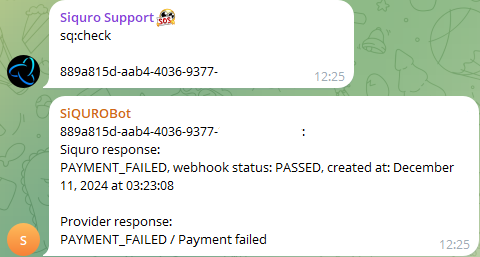
The bot also supports bulk transaction verification. You can write multiple IDs in the following format:
sq:checkid
id
id
id
Alternatively, you can separate the IDs with commas in a single line:
sq:checkid, id, id, id
Here’s an example of how it looks:
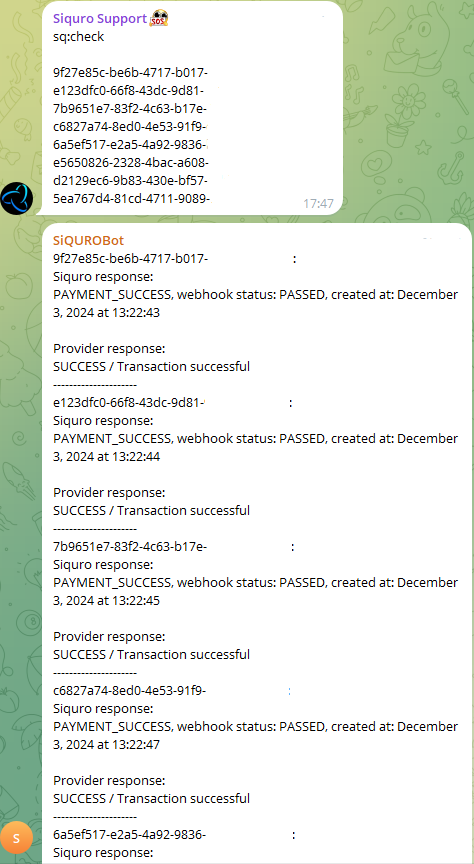
The bot will recognize the IDs in any of these formats and process them for verification. In response, you will receive the following information:
- Siquro response: This is the response from our back office (BO). It includes the transaction status, amount, webhook status, creation date, and time of the webhook.
- Provider response: This is the response from the provider, showing the transaction status on their side.
IMPORTANT NOTES:
- Telegram message size limit: Telegram imposes restrictions on message size (4000 characters). You should limit a single check request to no more than 10 transactions at a time. If you want to verify a large number of transactions, we recommend splitting your sq:check request into several smaller requests. Otherwise, you may encounter an error, as Telegram will not allow the bot to send such a large response.
- Status discrepancies: Please note that there may occasionally be discrepancies between the Siquro response and the Provider response. If you notice that the transaction status in the Siquro response is PAYMENT_COMPLETE, but in the Provider response it shows, for example, TIMEOUT, you can rest assured that we have successfully received the funds